
Plan Your Visit
Know Before You Go!
Bag Policy
To uphold health and safety protocols, minimize contact and ensure a more seamless entry process, our venues have adopted a no bag policy.
- BAGS LARGER THAN 4” X 6” X 1.5” INCLUDING BAGS ASSOCIATED WITH LAPTOPS, TABLETS, CAMERAS AND BINOCULARS ARE PROHIBITED.
Single compartment bags, wallets, clutches, fannie packs, and clear bags smaller than 4" x 6" x 1.5" with or without a handle or strap are permitted. - Exceptions to this policy include: Bags required for dietary or medical necessity. Medical neccessity includes Diaper bags, Oxygen, Insulin, Epi-pens and other medical devices.
Medical or diaper bags must measure smaller than 16” x 16" x 8"
Mobile Ticketing Information
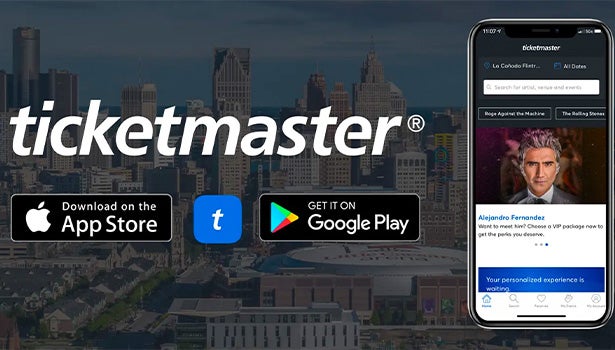
All 313 Presents event tickets purchased through Ticketmaster, the Box Office, Season Tickets, and Group Tickets are visible in the new 313 Presents Mobile App:
Mobile Ticketing Apps
- 313 Presents App: for season tickets, group tickets, Ticketmaster.com, or box office purchases. Download on the Apple App Store for iOS or the Google Play Store for Android.
- Ticketmaster App: for tickets purchased on Ticketmaster.com. Download on the Apple App Store for iOS or the Google Play Store for Android.
- Download either app, sign in with the same Ticketmaster account used to purchase your tickets, and your tickets will appear after signing in.
Additionally, guests may access their tickets anytime at 313Presents.com/MyAccount using your smartphone's browser.
Detroit Red Wings and Detroit Pistons have separate mobile ticket guides.
Still need help? Please visit 313Presents.com/MobileTickets for more mobile ticket support information & FAQ's, .
Prohibited Items & Entry Policies
Prepare for your event by reviewing the security, camera and prohibited item policies.
Re-entry is prohibited.
Please visit the links below to see the full list of prohibited items & entry policies for each venue.
- Little Caesars Arena Prohibited Items & Entry Policies
- Fox Theatre Prohibited Items & Entry Policies
- Fifth Third Park Prohibited Items & Entry Policies
- Pine Knob Music Theatre Prohibited Items & Entry Policies
- Michigan Lottery Amphitheatre Prohibited Items & Entry Policies
- Meadow Brook Amphitheatre Prohibited Items & Entry Policies
Cashless Payments
All points of purchase must be made via credit or debit card only and cash can not be accepted. MasterCard, Visa, Discover and American Express are accepted throughout all 313 Presents venues.
FAQ's
What time do doors open for shows and events?
- Doors for concerts and general events typically open 60 minutes before the scheduled event time. Door times are subject to change.
- All guests are screened upon entry, so please plan your arrival time accordingly.
- Fox Theatre Suite Ticket Holders: A complimentary buffet is available on the suite level from entry until the show starts. For more information, call 313-471-7313.
Where can I park?
- Olympia Development operates 32 parking facilities within The District Detroit. Guest are encouraged to reserve parking in advance through SpotHero, the nation's leading parking reservations app, for convenient, affordable parking guaranteed before you arrive.
- At our amphitheatres, parking is included in your ticket price and offered onsite.
- For venue-specific directions, policies and parking maps, visit 313presents.com/Parking
Will events be cancelled due to rain, snow or inclement weather?
- All shows are “Rain or Shine” events. Shows are only cancelled or postponed in extreme inclement weather.
- Tickets for all events are sold on a non-refundable and non-exchangeable basis, as clearly marked on each ticket.
- For up-to-date information, check our social media channels:
How can I access private club spaces and suites at 313 Presents Venues?
- Little Caesars Arena: Jack Daniel’s Club No. 7 is accessible via season memberships only.
- Pine Knob Music Theatre: Trinity Health Ivy Lounge is accessible via season memberships only.
- Michigan Lottery Amphitheatre: MotorCity Casino & Hotel VIP Club is accessible to season members and guests who have purchased a club pass.
Purchase MotorCity Casino & Hotel VIP Club Access - Meadow Brook Amphitheatre: VIP SunDeck is accessible to season members and guests who have purchased a club pass.
Purchase Meadow Brook VIP SunDeck Access - Fox Theatre: Suite Level is accessible to guests with a suite ticket.
Indvidual Suite Rentals - For more information on premium seating, visit 313Presents.com/Premium ir contact the Premium Sales department directly at 313-471-7313 or premiumsales@313presents.com.
Do you give tours of 313 Presents venues?
- Group and private venue tours of Little Caesars Arena, The Fox Theatre and Fifth Third Park are managed by Ilitch Sports + Entertainment and are available for all occasions, including field trips, summer camps, corporate outings, graduations, family reunions and more.
- For details and to submit a tour request, visit 313Presents.com/Tours.
I lost something at one of your events. How can I retrieve it?
- During the event: Found items are turned in to the Guest Services Office, where guests may inquire at any time.
- After the event: Submit an inquiry at 313Presents.com/LostandFound.
How can I host an event at one of your venues?
- Private events: Call 313-471-3333 or visit thedistrictdetroit.com for more information.
- Publicly ticketed events: Call 313-471-3200 for more information.
Venue A-Z Guides